The 30-Day Plan: 3 Certificates on LinkedIn
Advertisement
By day 30, you can have three certificates you actually earned — not audited, not started-and-abandoned — sitting on your LinkedIn profile and in a new line on your resume.
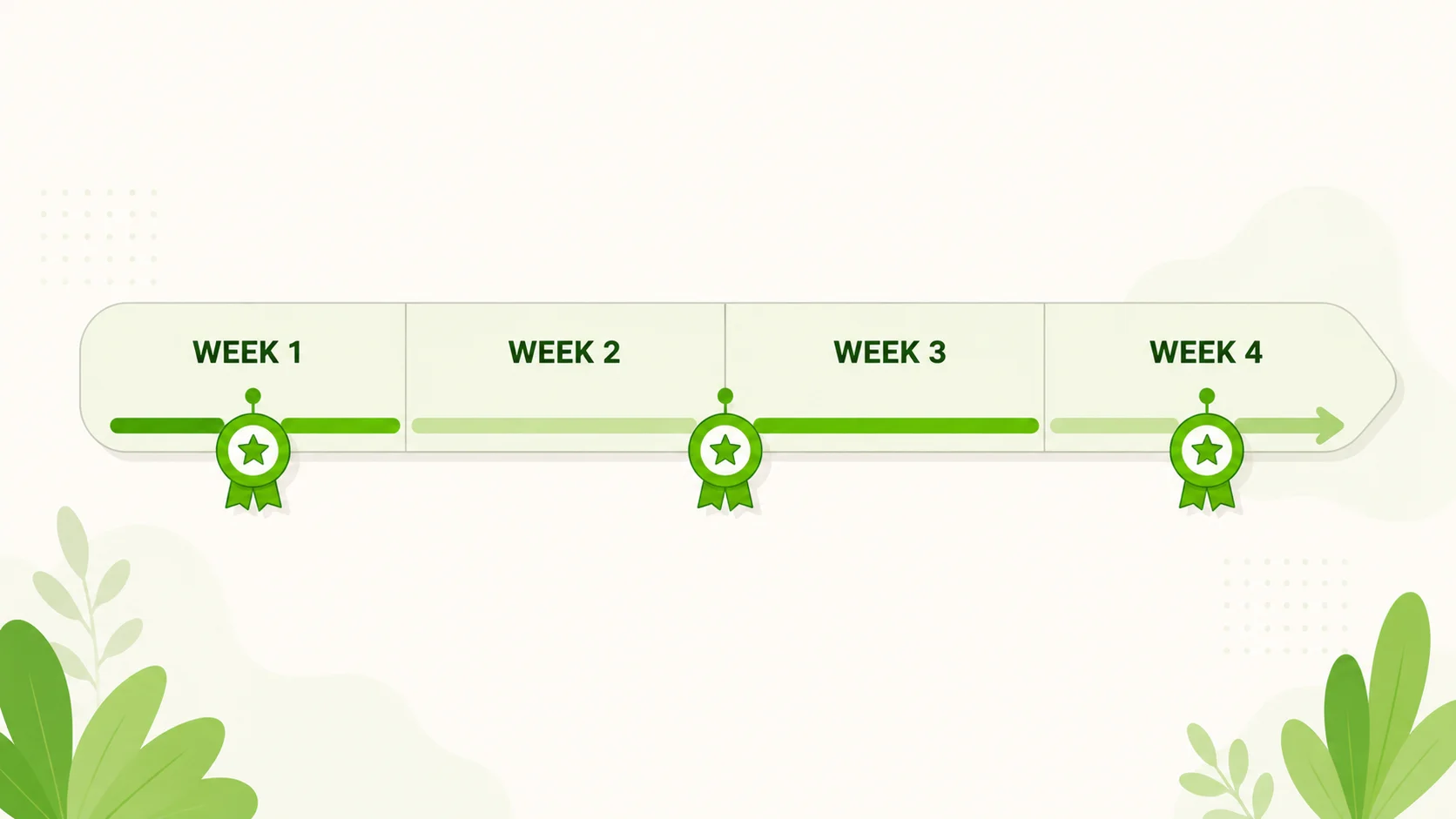
I built this plan around one observation: people who never finish a free course usually aren’t short on motivation, they’re short on a deadline. “Learn something new this year” produces nothing. “Finish this by August 12” produces a certificate.
Thirty days is long enough to actually learn something and short enough that you won’t quietly abandon it in week six. The plan below runs in four blocks: a fast first win in week one, two weeks on the certificate that will actually matter to a hiring manager, and a final week where you add a third credential and make sure your LinkedIn and resume reflect the work. If you haven’t already, start with my guide to the five certificates worth earning first — this plan assumes you’ll pick from that shortlist.
Week 1: Your Quick Win (Days 1-7)
The point of week one isn’t the certificate itself, it’s proof — to you — that you can start something free and finish it in under seven days. Pick one credential from the fast-and-free tier: Google Skillshop (Google Ads or Google Analytics/GA4), HubSpot Academy, Semrush Academy, a Kaggle micro-course, or the first module of Elements of AI, the University of Helsinki’s introduction to artificial intelligence — historically one of the few AI credentials that’s genuinely free including the certificate itself, not just the audit. I pulled this shortlist from my longer list of free certificates you can finish this weekend; my guide to free AI certificates covers which AI-labeled options are genuinely free and which need a subscription once you dig past the marketing page. All of the week-one options above are genuinely free including the credential itself, and most take somewhere between three and ten hours of real study time — Elements of AI runs longer if you finish the whole thing (closer to 25-30 hours), so if you pick that one, treat week one as the start, not the finish line.
- Day 1: Pick one quick-win certificate from the fast-and-free tier above and create your account.
- Day 2: Watch or read the first two modules. Don’t take notes you’ll never reread — just get moving.
- Day 3-4: Continue at a pace of roughly one hour a day.
- Day 5: Finish the remaining course material.
- Day 6: Take the assessment or final quiz. Most of these allow retakes if you don’t pass the first time.
- Day 7: Download the certificate or badge and save it somewhere permanent, not just your inbox.
Hold off on adding this one to LinkedIn just yet — you’ll do all three certificates at once in week four, so the wording stays consistent.
Weeks 2-3: Your Main Track — IT Certification, Project Management Certification, or Google Career Certificates (Days 8-21)
This block moves the needle on your resume most, so it’s worth choosing deliberately. You have two honest paths here, and which one fits depends on your budget and calendar, not on which sounds more impressive.
Path A — free to completion. Cisco Networking Academy’s “Introduction to Cybersecurity” course is a legitimate entry-level IT certification, and I checked the real time commitment: about 6 hours, not the multi-week grind the marketing sometimes implies. IBM SkillsBuild’s AI Fundamentals badge runs closer to 10 hours. Neither replaces a computer science degree, but both are real, Credly-verified badges you can finish without paying anything. Because they’re short, most people clear Path A well inside the two-week window — use whatever’s left to add Cisco’s “Python Essentials” course too (roughly 30–40 hours), rather than stretching a 6-hour badge across fourteen days.
Path B — the deeper credential, if you have the hours and the budget. Google Career Certificates (Data Analytics, IT Support, Project Management, UX Design, Digital Marketing & E-commerce) are hosted on Coursera and go deeper than a free badge — but the terms matter, since this is where people get misled. You get a 7-day free trial. After that, Coursera charges a subscription, roughly $49 a month, unless you apply for and are approved for Coursera’s financial aid — a real, legitimate free path, but one that requires an application, not something automatic. Most learners take three to six months to finish a full Google Career Certificate at a normal pace, so two weeks here realistically gets you through the first course or two, not the whole specialization. That’s fine — a certificate listed as “in progress, two courses completed” is still an honest, specific line, and you can keep going past day 30.
If your real goal is a project management certification with more weight behind it, something like the PMP, treat the Google Career Certificate as a stepping stone, not the finish line. The PMP requires exam fees and documented work experience; the free certificate just tests whether the field suits you first. And unlike online degree programs, which run one to four years and cost thousands to tens of thousands of dollars, everything here is measured in hours or months.
| Path | Typical time to finish | Real cost | Best if… |
|---|---|---|---|
| Free-to-completion badge (Cisco Networking Academy, IBM SkillsBuild) | About 6-10 hours | $0 | You want a genuine IT certification at zero cost |
| Google Career Certificate (Coursera) | 3-6 months at a normal pace | Free 7-day trial, then ~$49/month, or free with approved financial aid | You want a deeper, employer-recognized track and have weekly hours to give it |
| edX verified certificate | Self-paced, usually weeks | $50-$300 (up to 90% off with financial assistance) | The specific university’s name on the credential matters to you |
| Online degree programs | 1-4 years | Thousands to tens of thousands of dollars | You need an accredited degree, not a skills credential |
- Day 8: Compare the two paths above and pick one.
- Day 9-11: Complete the first module or course. Aim for progress you can point to, not perfection.
- Day 12-14: Keep going. If you’re on Path A, this is your window to add a second badge. If you’re on the Coursera trial, set a reminder two days before it ends so you can decide — subscribe, apply for financial aid, or downgrade to free auditing — before you get charged by surprise.
- Day 15-18: Continue the coursework. This is the week most people quit. It’s also the week that separates a finished certificate from an abandoned browser tab.
- Day 19-21: Finish what you set out to finish for this block, take the assessment, and save your certificate or badge. If you’re not done with a multi-course track, note exactly which courses you completed — be specific, not vague.
For what a genuinely free, no-catch credential looks like end to end, the Harvard CS50 certificate is the clearest example I’ve audited — issued directly by CS50, at no cost, even the version you’d put on a resume.
Week 4: A Third Certificate, Then LinkedIn and Your Resume (Days 22-30)
The last week has three jobs: earn a third credential, then spend real time making sure the first two don’t just sit unseen in a downloads folder.
- Day 22-23: Pick a second quick-win credential from the same fast-and-free tier you used in week one — Canva Design School, Semrush Academy, a second Kaggle micro-course, or Elements of AI if you didn’t already claim it — ideally something that complements your main track rather than duplicating it.
- Day 24: Finish the coursework and take the assessment.
- Day 25: Before you add anything to your profile, run each certificate past my checklist for the certificates recruiters actually respect — not every badge deserves equal billing.
- Day 26-27: Add all three credentials to LinkedIn properly, in the Licenses & Certifications section, not just a line in your headline. My guide to adding certificates to LinkedIn covers exactly where each field goes and what to skip.
- Day 28-29: Update your resume. One new line under a “Certifications” heading, worded specifically — the resume wording section of that same guide has real examples if you’re stuck on phrasing.
- Day 30: Step back and review. You now have three real credentials, a LinkedIn profile that reflects them accurately, and a resume that’s genuinely different than it was a month ago.
If You Fall Behind
I’d rather tell you the truth than sell you a fantasy: most people who start this plan don’t hit every checkbox on the exact day I’ve written it next to. That’s fine. The 30-day frame exists because a deadline beats procrastination, not because missing a day or a week means starting over.
If you lose a week to a sick kid, a work crunch, or just a bad stretch, don’t restart the whole plan from day one. Pick up where you left off and shift everything else back. A quick-win certificate finished in 12 days instead of 7 is still a finished certificate. A main-track certificate that takes six weeks instead of two is still further along than it was. The only version of this plan that fails is the one where a missed day turns into a closed browser tab you never reopen. Consistency, even slow consistency, beats speed every time here.
Where This Leaves You
If you follow this plan, on day 30 you’ll have three certificates you can verify, a LinkedIn profile listing them correctly, and a resume line that wasn’t there a month ago. Every link above is free to follow today, in whatever order fits your schedule. For a longer view of where each certificate track actually leads — which ones stack into a real career direction and which ones are a dead end after the badge — my career paths hub breaks it down by field, and you can browse the full list of vetted options on the free courses with certificate page.
Can I really finish three certificates in 30 days with a full-time job?
Realistically, yes for two of the three. The quick-win credentials in weeks one and four typically take 3-15 hours total, which fits around a job. The main-track certificate is the honest exception: a full Google Career Certificate needs more than two weeks. Choosing the free-to-completion IT certification path instead — Cisco Networking Academy or IBM SkillsBuild, about 6-10 hours combined — is the realistic route to three finished certificates in exactly 30 days.
Do I have to spend any money to complete this plan?
No. Every certificate named in weeks one and four is free, including the credential itself. The only place money enters the picture is if you choose the Google Career Certificate route past its 7-day free trial without applying for financial aid, and even then, that’s a choice, not a requirement of the plan.
What if I already have a certificate or an online degree — is this plan still useful?
Yes, in a smaller way. The quick-win certificates in weeks one and four are still worth adding since they’re free, fast, and signal current activity in your field, which matters if your last credential is a few years old. Use week four’s LinkedIn and resume steps either way — a formal credential that isn’t listed correctly does you no good.
Which certificate should I pick for the main track in weeks two and three?
Match it to what you’re job-hunting for. If you want an IT certification specifically, start with Cisco Networking Academy or IBM SkillsBuild — both finish in well under two weeks. If you’re aiming at data, UX, digital marketing, or a project management certification track and can spare more hours a week, now or after day 30, the Google Career Certificate specializations go deeper, with the honest caveat that most people need a few months, not two weeks, to finish the whole thing.
Start day one now
The core free courses this plan points to — open one and start your quick win today.

These links open the official provider on another website.